
Your photo. A fresh start.
Free AI background remover
100% Automatically andFree
Remove the background from your photo automatically. Refine the cutout, choose a new background, and download your image.
or drop a file,
paste image or
No photo handy? Try an example.

 Original imageBackground removed
Drag to compare. Actual output from our background remover.
See what our AI background remover can do
Compare the original image with the background removed. Explore examples for people, products, pets, and cars.

 Original imageBackground removed
Isolate your product from the original scene. Keep a transparent background or add a clean, solid color.
How to remove a background from an image
- 01
Upload your image
Choose a JPG, PNG, WebP or BMP image up to 3 MB. Drag it onto the page or paste it from your clipboard.
- 02
Remove and refine
Remove the background automatically, then use the erase and restore brushes to adjust the result.
- 03
Download your PNG
Keep the background transparent or add a new one, then download your image without a watermark.
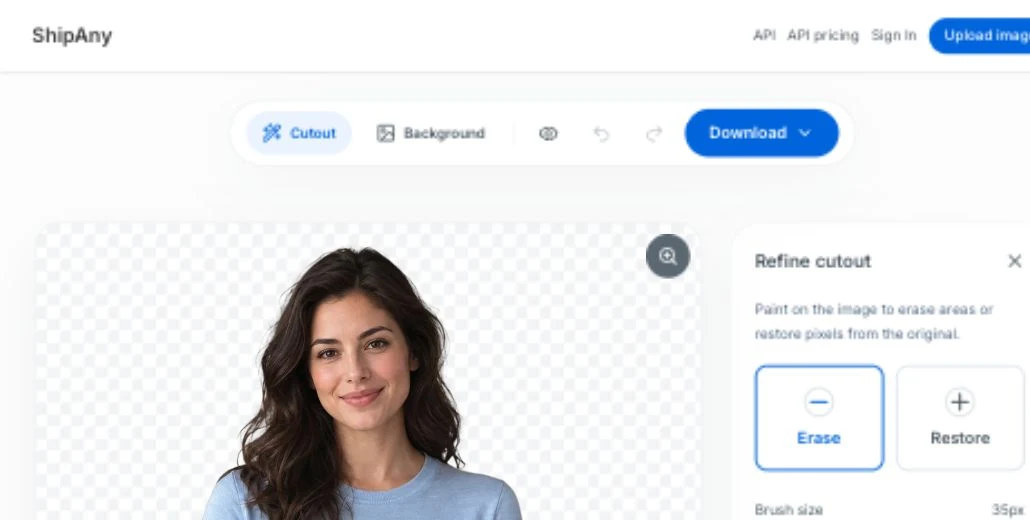
A little more control
Refine your cutout with the background eraser
Use the erase and restore brushes to adjust the automatic result. Change the brush size, undo edits, and compare with your original photo.
- Erase unwanted areas. Restore missing details.
- Undo, redo, and compare with the original.
Make it your own
Keep it transparent or choose a new background
Download a transparent PNG, pick a solid color, or upload your own background image. Your cutout stays the same; the setting is up to you.
Preview the options above. Upload your photo to create your own.

Need background removal in your app?
Explore our background removal API, including compatibility details for teams moving from remove.bg.
A familiar request structure
POST /v1.0/removebg
X-API-Key: YOUR_API_KEY
image_file: photo.jpg
API access uses a separate plan and credits. Check supported parameters before migrating.
Background remover FAQs
Is this background remover free?
Yes. You can remove a background, refine the result, and download your PNG for free on this website. Developer API access uses separate plans and credits.
Do I need to sign up?
No account is needed to upload, edit, and download images using the online background remover.
Will my image have a watermark?
No. The online editor exports your PNG without adding a watermark.
Can I remove backgrounds from WebP or BMP images?
Yes. Upload JPG, PNG, WebP or BMP images up to 3 MB each. The online editor downloads the finished result as a PNG.
Can I manually erase or restore parts of an image?
Yes. After automatic background removal, use the erase and restore brushes, adjust the brush size, or undo and redo your changes.
Can I download a transparent PNG?
Yes. Keep the background transparent, or add a color or your own image before downloading. Choose a preview or the full processed size; this does not upscale the original.
Remove your image background for free
Upload a photo, refine the result, and download your PNG.
No sign-up · No watermark